Closer. The easiest way to run, review, and deliver the close.
The system we built to run our own clients’ books — the one that doubled our firm’s capacity — now shared with you. Closer runs your month-end close: tasks on schedule, automated checks over your books, AI agents for the repeatable work, and live financials you review and fix in one place.
📈 2x capacity at our own firm
🗓️ Month-end close
🔗 Works with QuickBooks Online
🤖 Works with Claude via MCP
01 — The big idea
Review, don't redo.
Most of the close is the same work every month. Closer does it: tasks spin up, checks sweep the books, agents handle the repeatable steps. Your team only sees what needs judgment.
It’s how we close our own clients’ books every month. Now it can close yours.
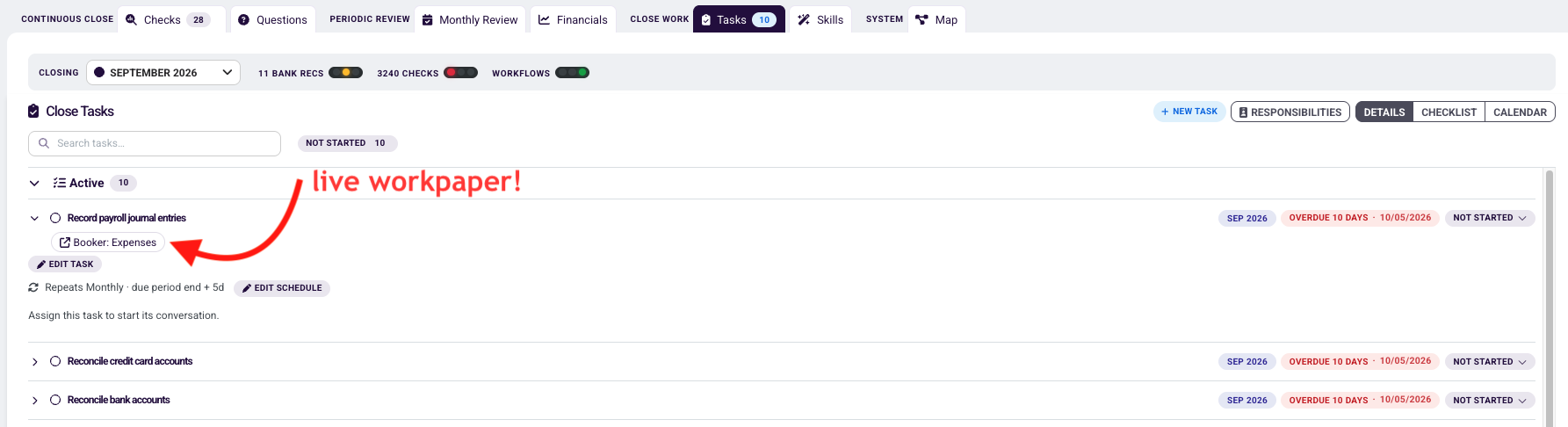
Every client gets its close tasks each month — assigned, ordered, and tracked.
Assign preparers and reviewers.
Set dependencies — e.g. no bank rec until statements are saved.
Attach a Skill so an AI agent does the work.
Attach live workpapers to any task — a Booker, an Excel file, or a Google Sheet — so the work lives right where the task does.
03 — Automated QA
Checks that never skip a step.
Closer runs checks over your books and surfaces only the findings that need a human.
👥
Duplicate vendors & customers
“Amazon”, “Amazon.com”, and “AMZN Mktp” are the same payee.
🔁
Duplicate transactions
The same bill entered twice, or a feed item booked on top of a sync.
🏷️
Likely miscategorizations
A vendor coded to an account it’s never hit before.
🧹
Clearing accounts that don’t clear
Undeposited funds, suspense, and in-transit balances that should be zero.
↕️
Balances in the wrong direction
A debit-balance liability or a credit-balance asset.
⏳
Long-standing balances
Balance sheet accounts that haven’t moved in months.
📥
Missing accruals
Recurring expenses that didn’t show up this period.
❓
Money movements missing a name
Transactions with no vendor or customer attached.
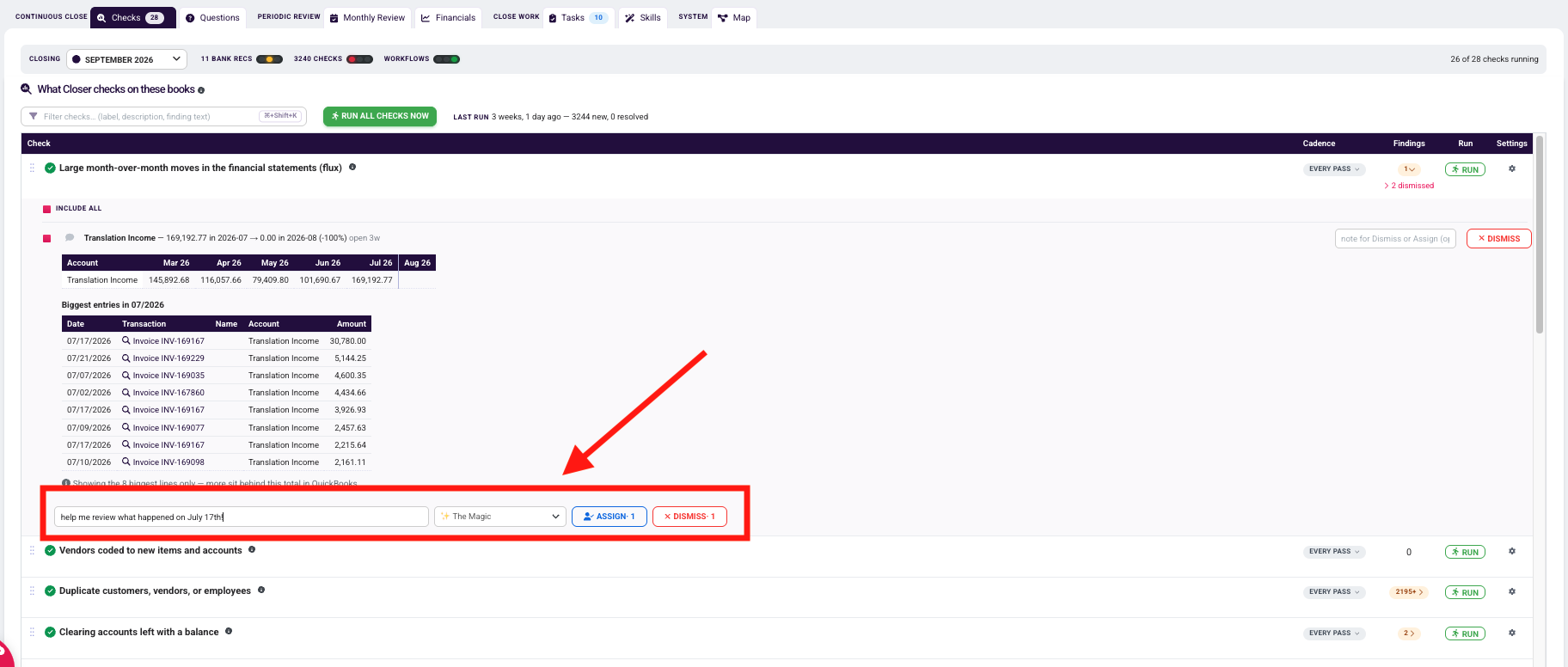
For every finding: fix it, assign it, or discuss it in plain English.
Income dropped in August, so the question goes to The Magic: “help me review what happened on July 17th.” Its AI digs into the entries and reports back. Or assign the finding to a teammate or a client contact.
🧠
Dismiss it once, and Closer remembers why. Add a reason and it won’t nag you next month. Undo anytime.
04 — Skills
Assign the task to an agent.
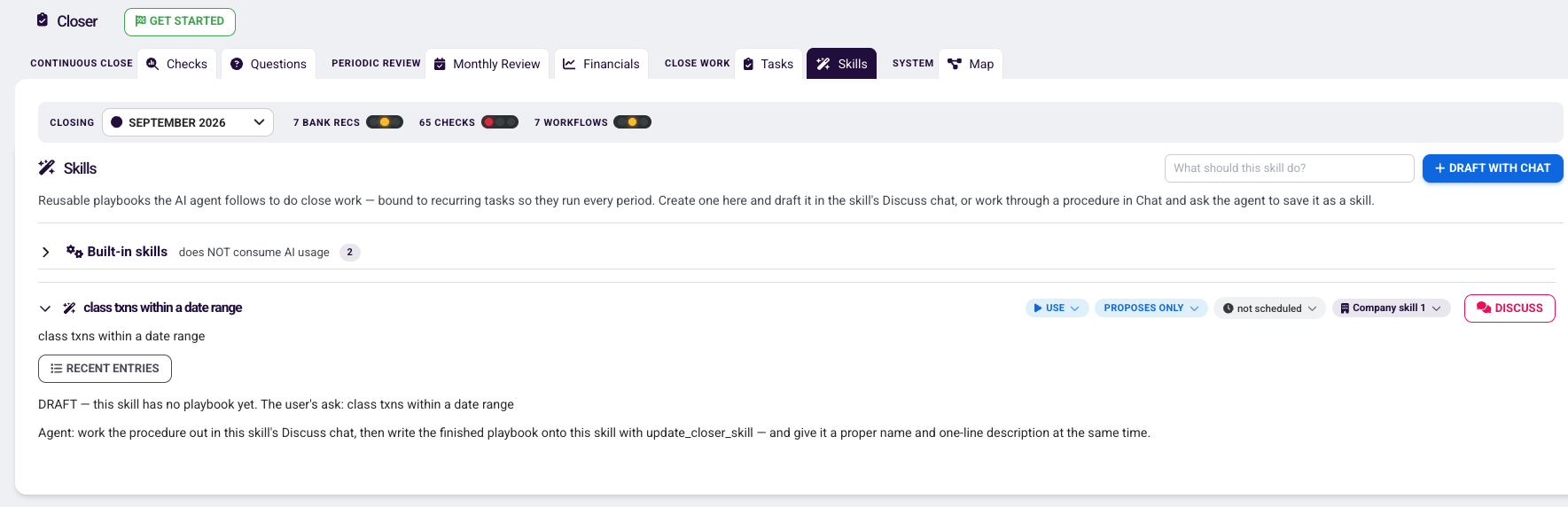
Skills are playbooks an AI agent follows to do close work. Bind one to a recurring task and it runs every period.
Built-in skills are maintained by FinOptimal and work out of the box. Custom skills teach the agent how your firm does the books:
P&L flux analysis
Reclassifying transactions based on your logic
Ingesting data from other sources and pushing it into QuickBooks your way
Any process you want done the way you’d do it
💬
Start with a chat. Work the process through with the agent. Once it’s right, promote the chat to a skill.
1It proposes.
The agent does the work and tells you exactly what it wants to book.
2You preview.
Every proposed entry is staged — download it as an Excel file if you like.
3You approve.
Request changes, or say “approved” and it books to QuickBooks.
4Autopilot.
Once you trust it, let it book on its own — on schedule.
🍽️
Messy inputs welcome. One firm turns ten raw Toast reports into a staged journal entry. New categories get flagged for review.
Built-in and custom skills in one place. Set each to propose only or book on its own, schedule it, and refine it in its Discuss chat.
05 — Financials review
Review the financials. Fix them right there.
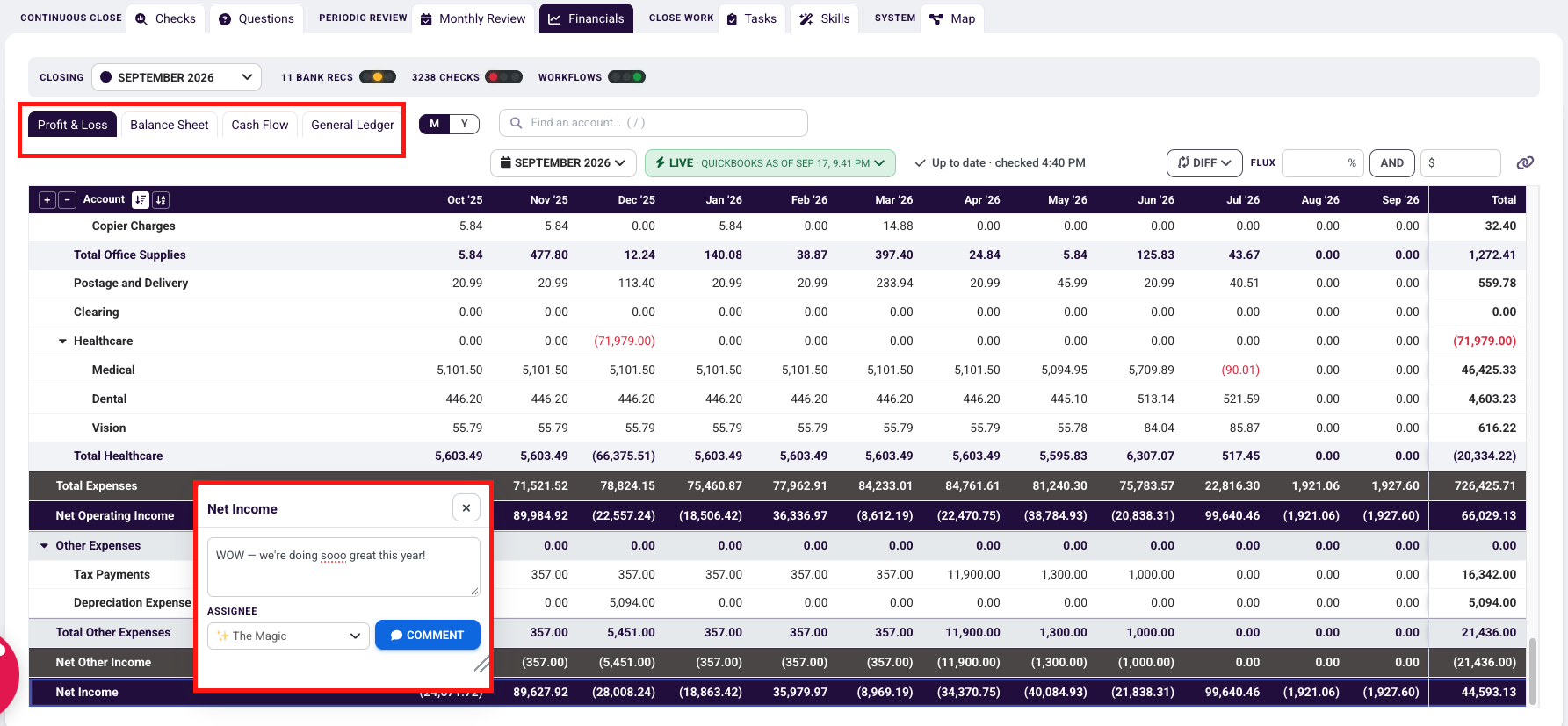
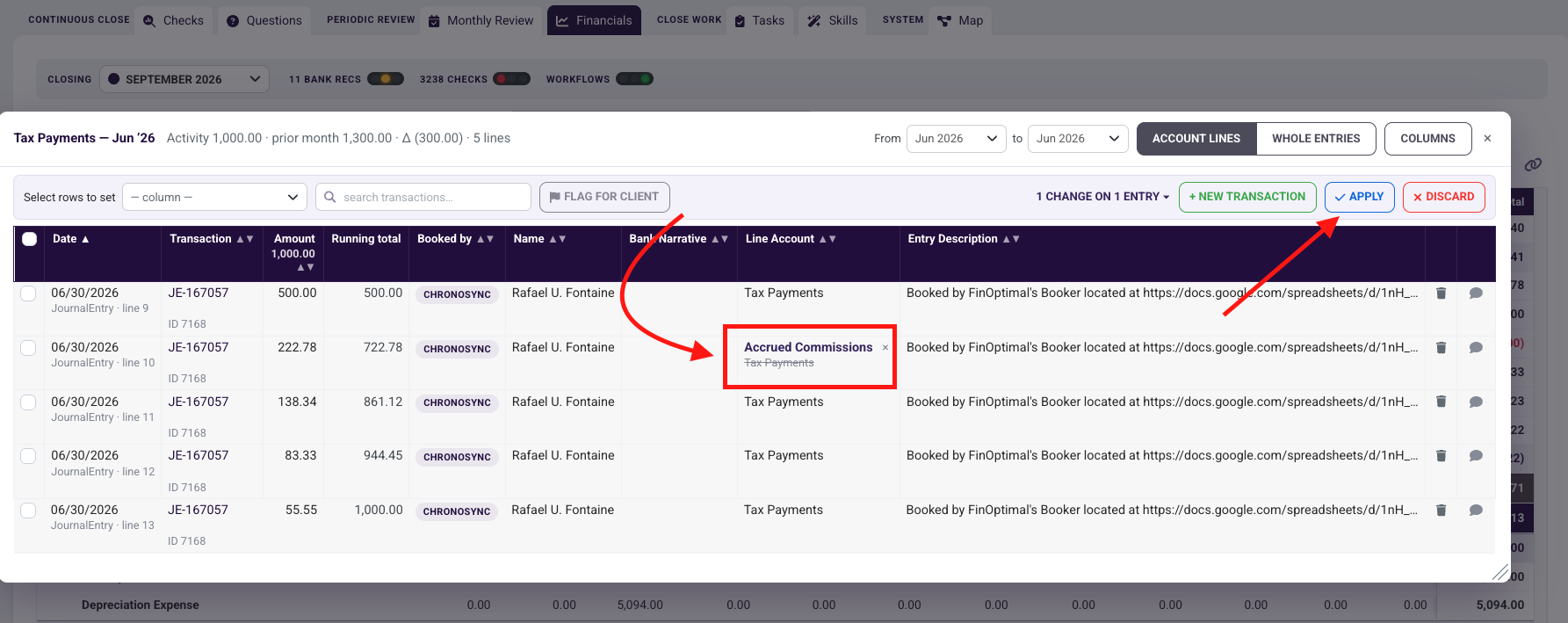
Live financials from QuickBooks. Comment on the statements, drill to the transaction, and fix it without leaving the review.
From financials review you can:
Drill from any balance to the transactions behind it.
Comment on the statements and tag your team.
Save versions and toggle between them to confirm fixes.
Edit transactions in place, one at a time or in bulk.
Build custom monthly packages from your Wrangler reports.
Comment on any line of the financials and assign it to a teammate — or to The Magic if you want the agent to look into it.Click any cell to see the transactions behind it. Reclass, edit the description, or change anything else — hit Apply and it goes back to QuickBooks.
06 — Zoom out
Every client, one view.
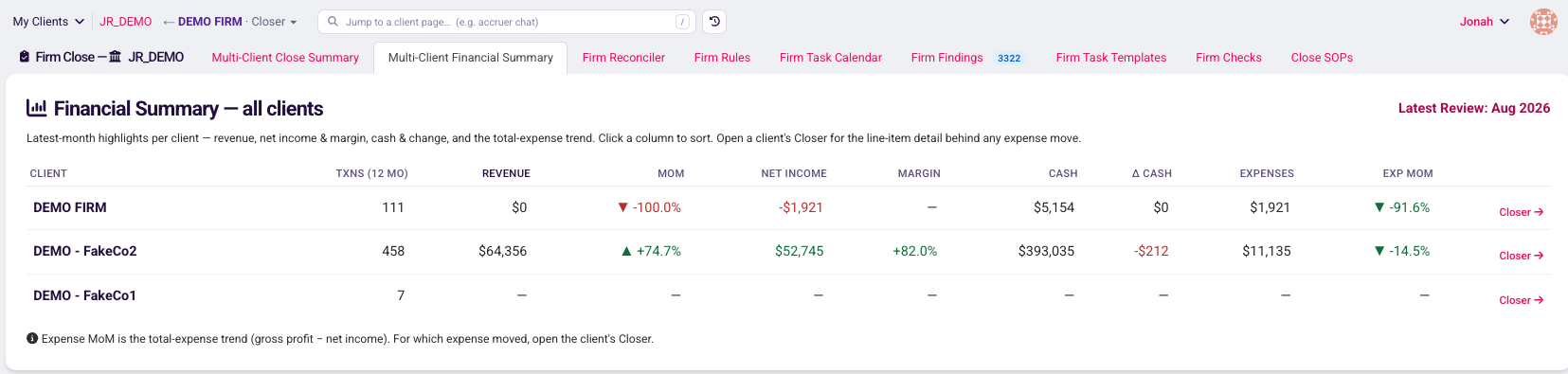
A bird’s-eye view of your whole firm — and who needs you.
Close Summary: every client and where its close stands right now.
Financial Summary: revenue, margin, cash, and expense trends across every client — who’s growing, who’s slipping.
Firm Reconciler: reconciliation status across your client base.
The Financial Summary tab: every client’s revenue, margin, cash, and expenses side by side. Switch to Close Summary to see where each close stands.
07 — Private beta 🔒
Now opening to a select group of firms.
Closer is in private beta with a select group of firms. Reach out to sales to see if your firm qualifies.
Stop doing the close. Start reviewing it.
Book a walkthrough and we’ll show you Closer on real books.