FinOptimal Product Overview

Reconciler. The easiest way to categorize and reconcile bank transactions.

Coding bank and credit card feeds is the bottleneck to a faster close. Reconciler categorizes and matches transactions automatically and continuously, keeping your books current every day and surfacing only the real exceptions — so your team moves from doing the work to reviewing it.

🏦 Bank & credit card feeds
🔗 Works with QuickBooks Online
01 — The big idea

Manage by exception.

Reconciler pulls your bank and credit card feeds into one view, right next to your books. It matches everything it can automatically — and everything that matches drops out of your way, turned green and reconciled.

What’s left at the top are the real exceptions: the handful of transactions that actually need a human decision. Instead of scrolling past hundreds of items that categorize themselves, your team focuses only on what’s genuinely ambiguous.

The goal: books that stay current on their own, so your people spend their time reviewing — not keying.

02 — The Reconciler view

Every account. One view.

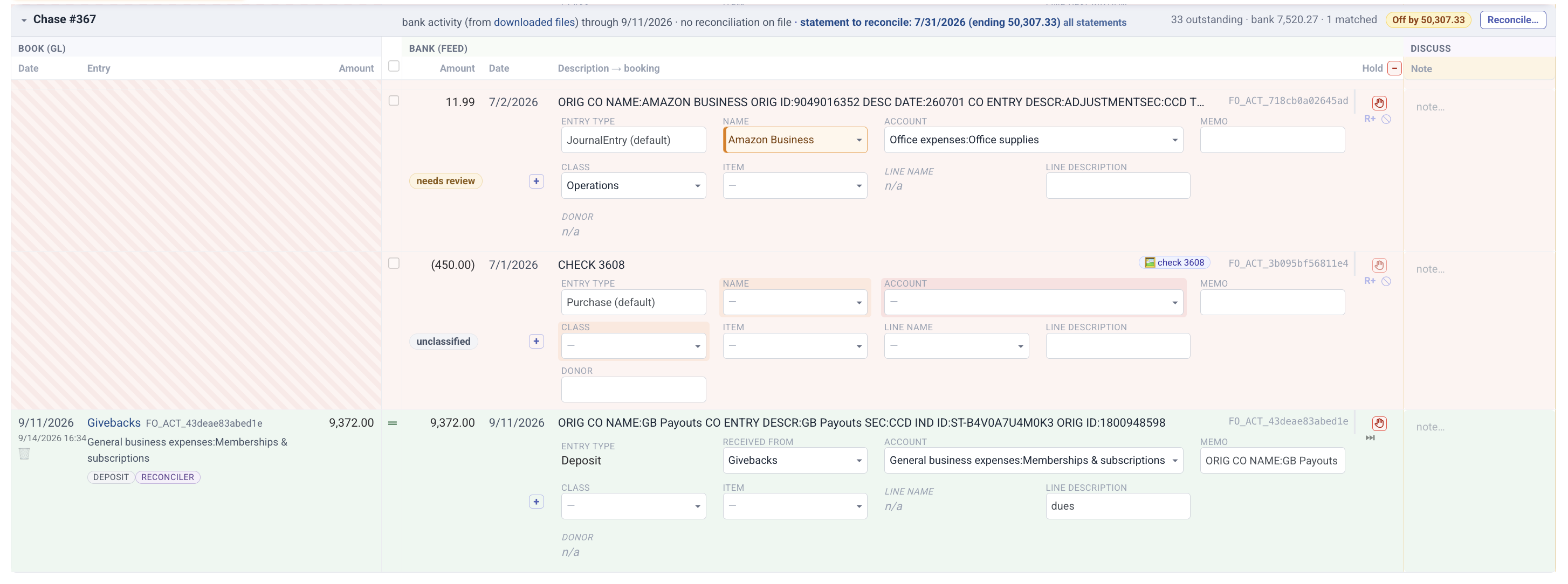
Review all of your bank and credit card accounts in a single consolidated view — your books on the left, the bank feed on the right. Green rows are matched and reconciled. Red rows are the exceptions waiting on you.

Reconciler view with books on the left and the bank feed on the right: a transaction needing review, an unclassified check, and a matched deposit
Books on the left, bank feed on the right, for every connected account in one list. Matched items clear out of the way; anything that needs review or is unclassified is flagged, with the entry type, name, account and class ready to set right on the row.
03 — Rules that write themselves

Let AI build your rules.

Click Suggest Rules and Reconciler reads your chart of accounts, your existing rules, and 12 months of booked history from QuickBooks — then proposes rules for the vendors that keep showing up. It learns from how you’ve actually categorized, not from generic defaults.

Suggest Rules progress: reading the chart of accounts and existing rules, the open bank activity no rule covers, and 12 months of booked history from QuickBooks
Suggest Rules reads your chart of accounts, existing rules, open bank activity and 12 months of QuickBooks history, then groups transactions by vendor for the AI to review.
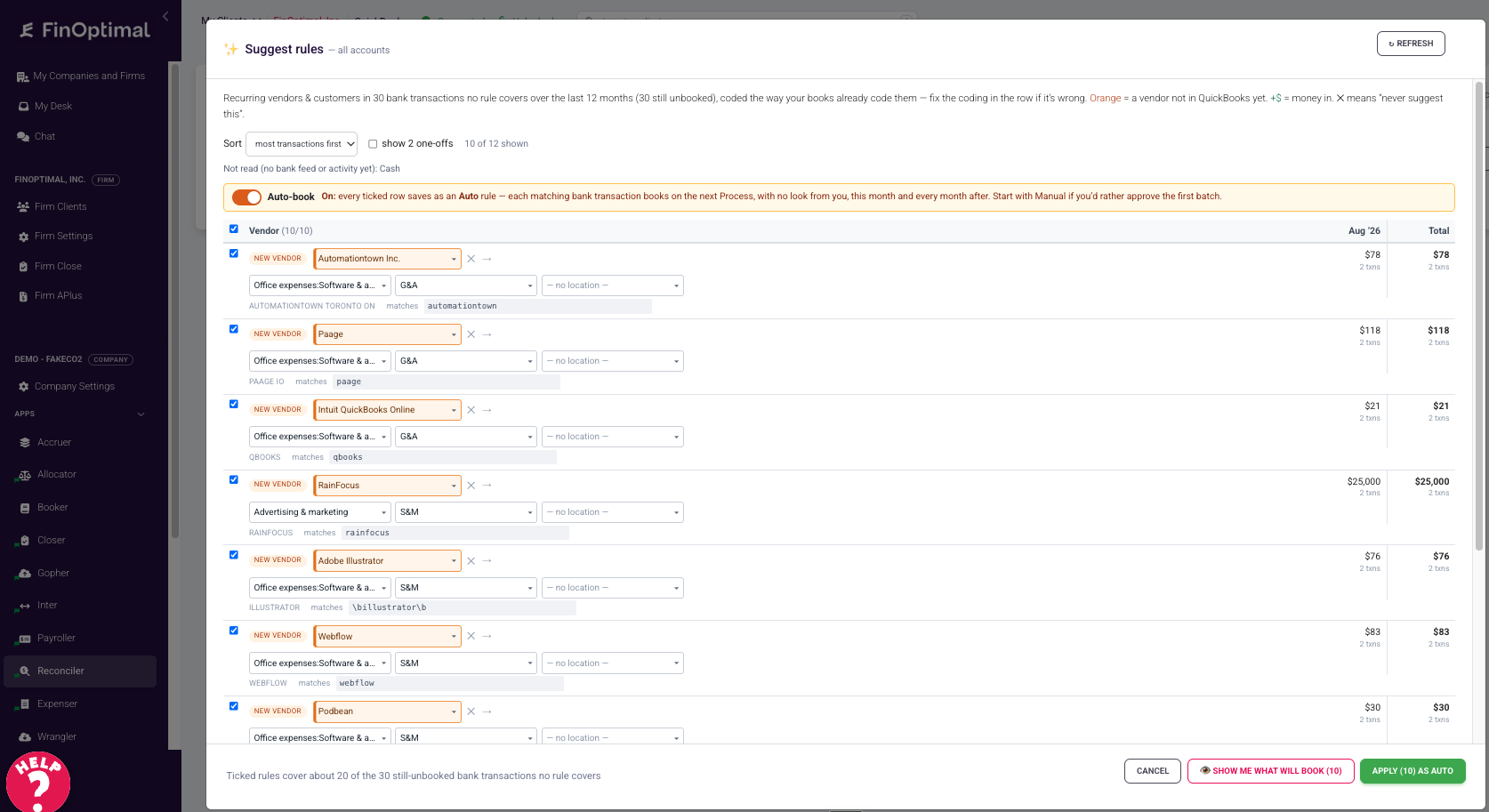
Suggest Rules results: recurring vendors with suggested account, class and location, an auto-book toggle, and a button to apply the rules
Then you review the suggestions vendor by vendor. Adjust the account, class or location if needed, switch on auto-book, and apply them all in one click.
🔁

Already have QBO bank rules? Bring them with you. Migration is seamless — Reconciler pulls in your QuickBooks bank feed and your existing bank rules, so you start from where you are today instead of rebuilding from scratch.

Once you approve them, rules run continuously — next month those vendors book themselves the moment they hit the feed.

These rules are smarter than QBO’s native bank-feed rules — they handle transfers, payments, and the messy many-to-one matches that trip up the standard feed.

04 — Full control when you want it

Every rule is editable.

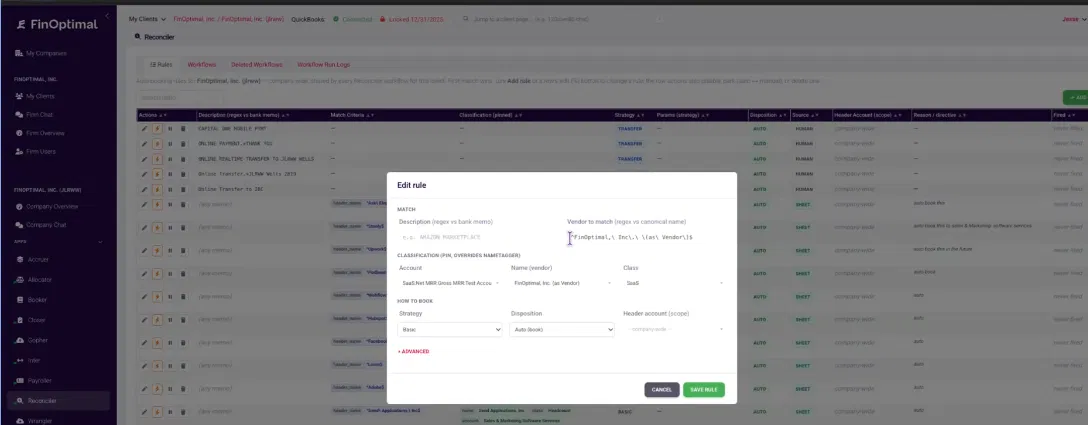
Open any rule from the Reconciler view to fine-tune matching, the vendor, the account, the class, and how it books.

FinOptimal Edit Rule screen for tuning match criteria, account, class, strategy and disposition
The Edit Rule screen. Adjust the match criteria, mapped account, class, and whether it auto-books or waits for your review. Click through, tweak, save — and it applies going forward.
05 — Investigate with chat

Just talk to it.

Chat is built into Reconciler. Ask it to dig through your QuickBooks history, find what’s been miscoded, stage the fix, and write the rule so it never happens again.

An example conversation. Chat finds the problem, proposes the reclass, and drafts the rule — and every change waits for your sign-off.

From chat you can:

06 — Coming next 🚨

🤖 Oh, and one more thing: the rec runs itself. 🔥

Our next release, Closer, turns your bank reconciliation process into a Skill. Bind it to your monthly Bank / CC Reconciliation task and an AI agent works every bank, card, and loan account through the period’s statement — following your firm’s steps, on schedule. Your team just reviews the result.

Man laughing with both hands raised in excitement

First, your books stay current on their own. Next, your reconciliation does too.

Reconciler is in early access today with a select group of customers who are helping shape the product.

See Reconciler on your own books.

Book a walkthrough and we’ll show you how Reconciler handles your bank and credit card feeds — and how much of the monthly categorization work it can take off your team’s plate.