How to Send HTML from Claude
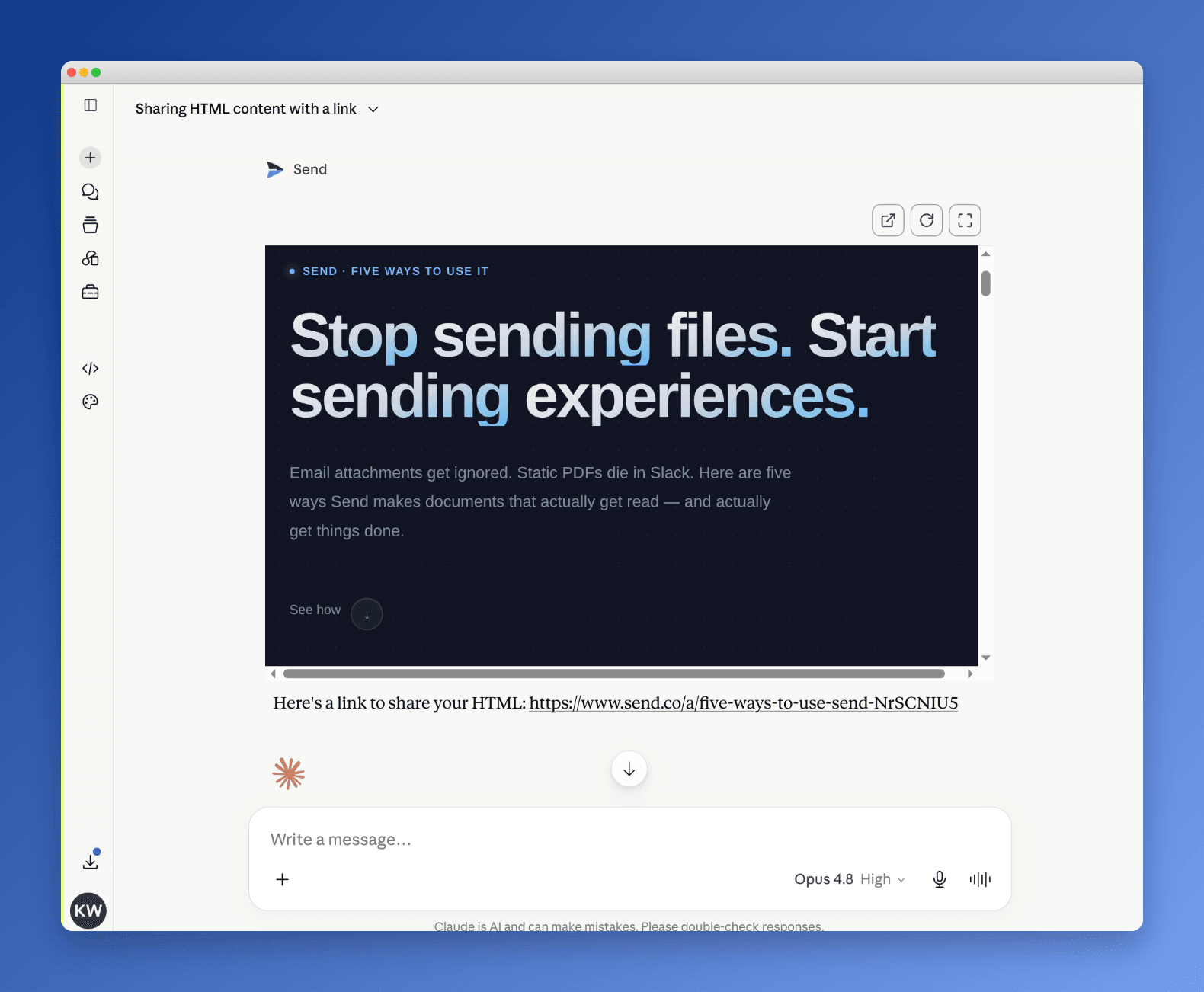
HTML has quietly become Claude's best output format. It holds more than markdown can, and unlike a flat doc, the reader can actually use it. Best of all, it travels as a link instead of an attachment. The catch is that a page is only worth as much as the people who open it, and most of the time you have no idea if anyone did.
In this guide you'll learn why HTML is the format worth sending, how to get Claude to build a page and host it with the Send connector, and how to share a single link that shows you who opened it and for how long.
Example of HTML You Can Send from Claude
Here's a real one. A landing page with a bold headline, a scroll cue, and sections you can move through. It reads like a small website, not a document. You described it in a sentence and Claude built it, then handed back a link to share.
What you don't see is the part that used to take a day. No repo, no hosting account, no deploy step. The page is live at a link the moment Claude finishes, and that link reports back every time someone opens it.
That's the whole shift. The page is the artifact and the link is the instrument.
Why HTML Is the Format Worth Sending
Claude can answer in markdown, but a page does more. HTML holds tables, charts, CSS layout, and SVG in one artifact, so a number can be a gauge and a process can be a diagram instead of a wall of text.
It's also the only format the reader can use. A slider stays a slider and a calculator stays a calculator, so the reader answers their own question instead of reading your description of the answer.
And it travels as a link, not an attachment. That matters more than it sounds, because a link is the version people actually open. A markdown file buried in an email rarely gets read.
Which is the whole problem. HTML's advantage is that it gets opened, and until now you couldn't tell whether it was. Sending it from Claude through Send closes that gap: the same link that makes the page easy to open also tells you who opened it.
Core Elements of a Sendable HTML Page
Every page you send from Claude comes down to three parts.
The Content
What the page says. You describe it in plain language and Claude writes the markup, the styles, and any interactive pieces. You never open an editor.
The Hosted Link
Send hosts the page and hands you one URL. There's no deploy and no account for the reader to create. The link is the page.
The Tracking
The part a static file will never give you. Every open is logged: who, when, where, and how long they stayed. The page watches itself so you don't have to.
Kinds of HTML Worth Sending (With Examples)
Some pages are a much better fit for this than a Google Doc. Each format below uses the same shape: a named page → when to reach for it → what goes in it → a real example.
1. The One-Pager: Hook → Proof → Ask
Use it when you need one link that explains a thing and asks for a next step.
- A headline that states the payoff
- Two or three sections of proof
- A single, obvious call to action
Example: A founder sends a one-page summary of the round, with a traction chart and a "book a call" button, instead of a five-paragraph email.
2. The Personalized Proposal: Context → Scope → Price
Use it when the page should feel built for one reader, not blasted to a list.
- A short note naming the client and the problem
- The scope of work, as a clean list
- Pricing, ideally with a slider or toggle the reader can play with
Example: An agency sends a proposal where the prospect drags a slider between retainer tiers and watches the deliverables update.
3. The Interactive Explainer: Concept → Control → Payoff
Use it when a static explanation would lose the reader but a thing they can poke won't.
- The concept stated in one line
- One control: a slider, a toggle, a small simulation
- The payoff the reader feels by using it
Example: A SaaS team sends a pricing explainer where moving a "seats" slider shows the real monthly cost, so the buyer answers their own question.
4. The Pitch Recap: Summary → Highlights → Next Steps
Use it right after a meeting, while the conversation is still warm.
- A two-line summary of what you discussed
- The three highlights you want remembered
- The concrete next step, with a date
Example: A salesperson sends a recap page the same afternoon, and sees from the tracking that the economic buyer opened it twice that night.
5. The Microsite: Headline → Value → CTA
Use it when you want a real landing page but not a real website project.
- A headline and subhead that sell the idea in five seconds
- A few value sections with one visual each
- A closing call to action
Example: A team sends a one-off launch page for a webinar, live in minutes, without pulling in design or eng.
How to Describe What You Want
You're not writing HTML, so describe the page, not the code. The more concrete you are, the closer the first draft lands.
Name the Page and Its Job
Tell Claude what it is and what it's for in one line. "A one-page proposal for an agency client that ends in a book-a-call button."
List the Sections
Give Claude the rows. "A headline, a scope list, a price slider with three tiers, and a CTA." A list of sections beats a paragraph of vibes.
Point to a Real Reference
If you've sent a page you liked, mention it. Claude matches structure better when it has a target to aim at.
How to Make It Interactive
A page someone can do something with outpaces a page they only read. This is where HTML earns its place over a doc.
Ask for One Real Control
Pick a single interaction that carries the point: a slider, a toggle between two plans, a small calculator. One that works beats three that don't.
Keep It Honest
The interaction should answer a real question the reader has, like "what would this cost me?" Skip animation that just decorates.
Iterate in Plain Language
Say "make the slider go up to 50 seats" or "swap the two middle sections." The page rebuilds and the link stays the same.
How to Share and Track the Link
Send the one link however you'd send anything else: an email, a message, a calendar invite. The reader clicks through with no account and no download.
Then the signal starts. You see when each person opened the page, where they were, and how long they stayed. A six-minute read is a different conversation than a four-second bounce.
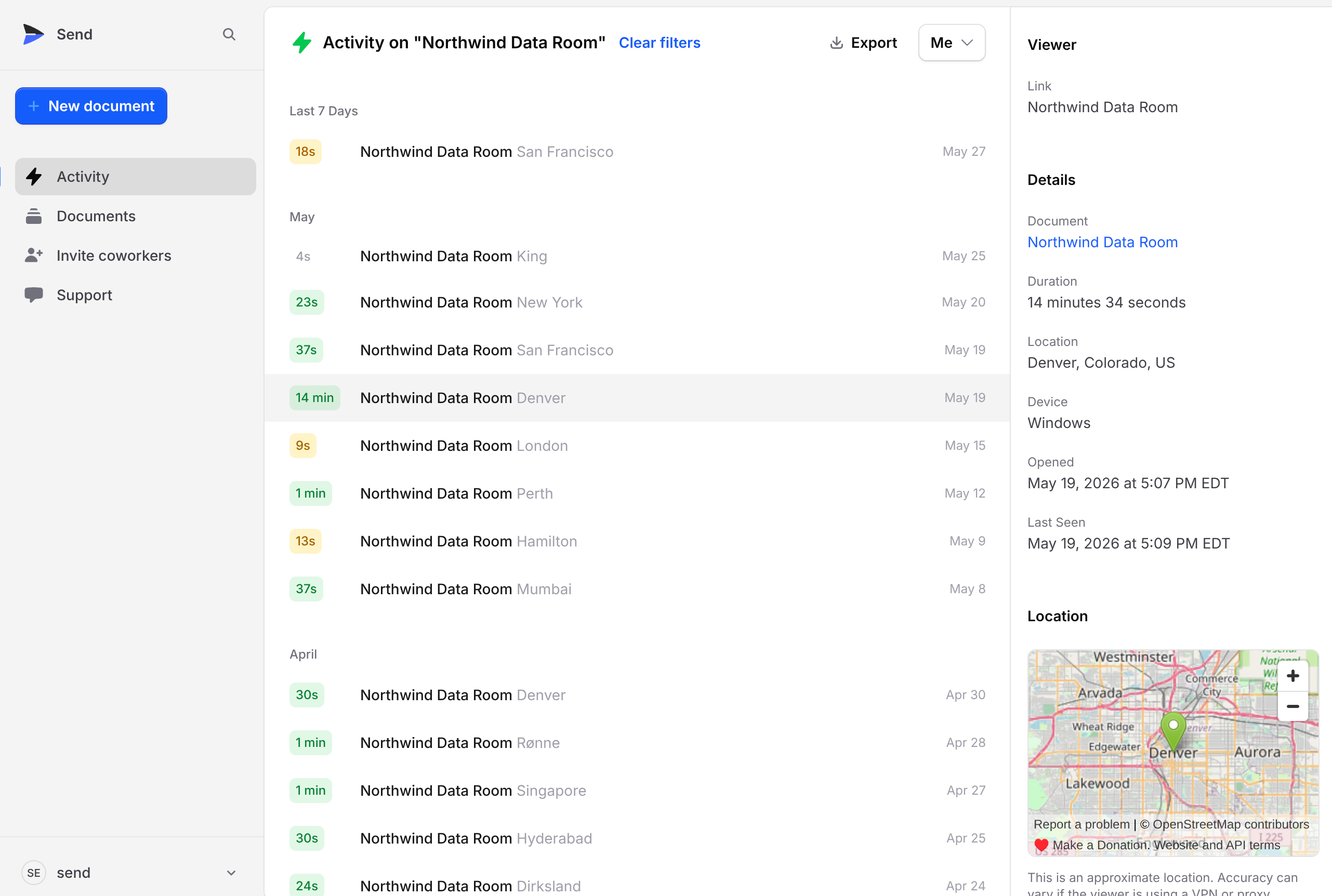
A file you email goes quiet the moment it leaves your outbox. This tells you who to call next.
Common Mistakes (and How to Fix Them)
Describing the code instead of the page. You don't need to mention divs or CSS. Describe what the reader should see and do, and let Claude handle the markup.
Cramming in interactions. Five toggles dilute the one that matters. Pick a single control that answers the reader's real question and cut the rest.
Treating it like a static export. The advantage of an HTML link is that it stays live and reports back. If you screenshot it and send the image, you've thrown both away.
Pasting the same page to everyone. When the page is this cheap to make, a named, personalized version is worth the extra sentence of prompt.
Ignoring the tracking. The opens are the point. If you never look at who read the page, you're back to sending files blind.
Why Send Makes Sending HTML Easier
We built Send because sharing something important and then hearing nothing back is a bad way to work. HTML made it worse: even when you could build a page, you still had to host it somewhere and you still couldn't tell who opened it.
With Send connected to Claude, the page Claude builds is hosted the instant it's done and tracked from the first open. You share one link and get back a live view of who read it, how long they stayed, and when interest spiked. No deploy, no analytics setup, no account for the reader. It's the same tracked-link workflow people already use for decks and PDFs, pointed at a page you made in a chat.
Connect Send to Claude
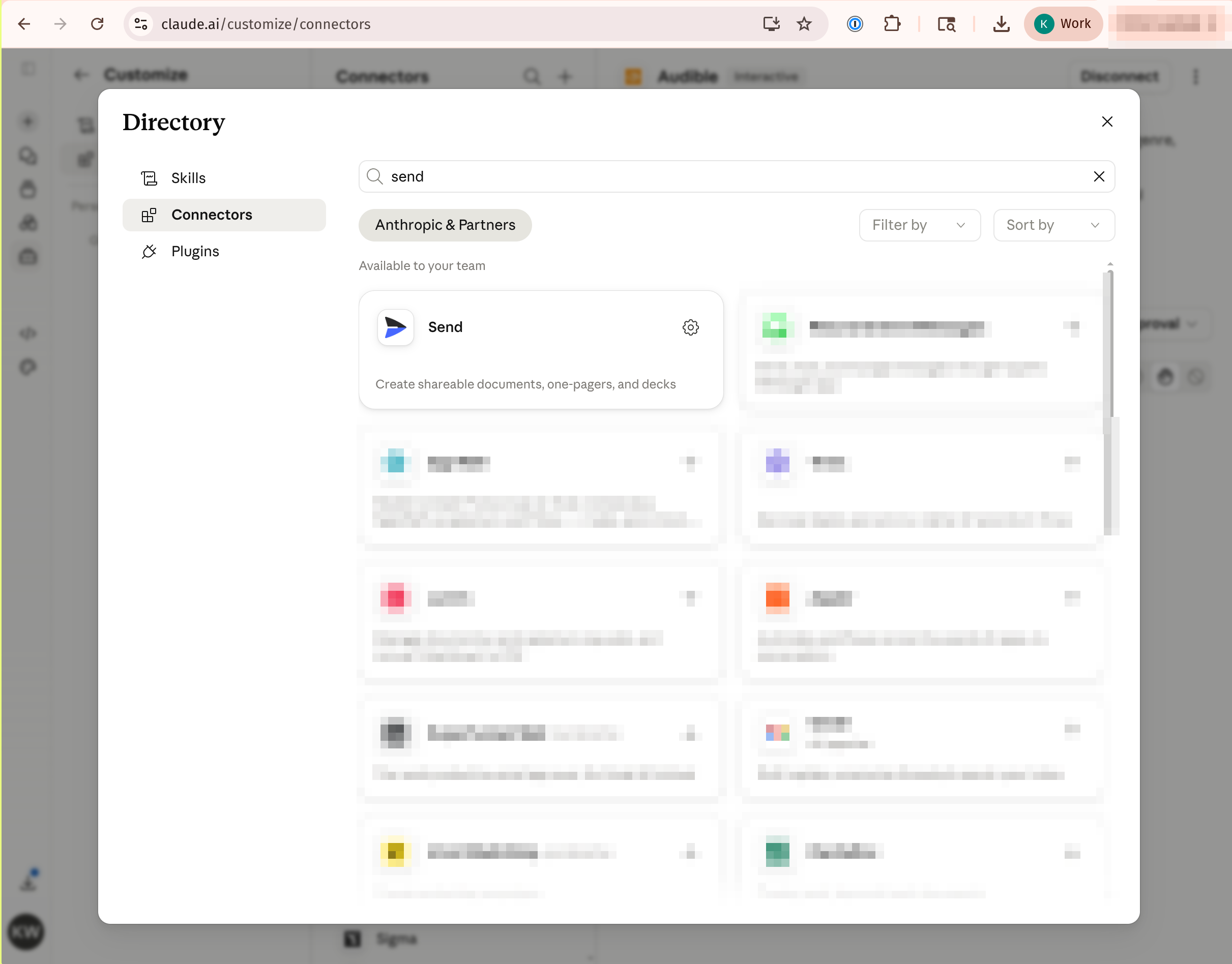
Add Send as a connector once. Open Claude's connector directory, search for Send, and connect it. After that, Claude can build, host, and share HTML on your behalf, and the connection persists across chats.
FAQs
Do I need to know HTML to send a page from Claude?
No. You describe the page in plain language and Claude writes the markup, styling, and any interactive elements. You only need to know what you want the reader to see and do.
Where does the HTML actually get hosted?
Send hosts it. When Claude finishes the page, Send returns a live link with no deploy step and no hosting account on your side. The reader opens the link directly in their browser.
Can the page be interactive, or just static?
It can be interactive. Sliders, toggles, calculators, and small simulations all work, because it's real HTML rather than a flat export. One well-chosen control usually does more than several decorative ones.
Can I edit the page after I share it?
Yes. Ask Claude for the change in plain language and the page updates in place. The link stays the same, so you never have to resend a new URL.
What can I see about who opened it?
For each viewer you see when they opened the page, roughly where they were, and how long they stayed. That's the difference between a tracked link and a file you email into silence.
Is this different from just exporting a PDF?
Yes. A PDF freezes the moment you export it and tells you nothing about who read it. An HTML page sent from Claude stays live, stays interactive, and reports every open back to you.
Send an HTML Page You're Proud Of
The best way to explain something is often a page someone can use, not a file they scroll. Get started with Send, build the page in Claude, share one link, and know exactly who opened it.